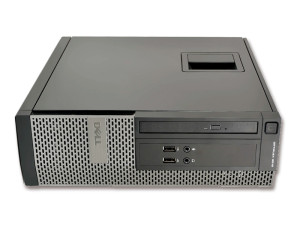
Especificaciones técnicas

Technical specifications of Lenovo ThinkCentre M90 SFF
Performance
ProcessorIntel Core i3-530 2.93 GHz
RAM Memory4 GB DDR3
Storage160 GB SATA HDD
Operating systemWindows 7 Pro
Display and graphics
GraphicsIntel HD Graphics
Video outputsVGA, DisplayPort
Expansion and connectivity
Optical driveDVD
USB ports8× USB 2.0
Other portsSerial, Parallel
ConnectivityEthernet RJ-45
Expansion slots1× PCIe x16, 1× PCI
Dimensions and weight
Dimensions35.5 × 32 × 10 cm
Weight7 kg
Other information
BrandLenovo
ModelThinkCentre M90
Form factorSmall Form Factor (SFF)

Descripción del producto

Why choose the Lenovo ThinkCentre M90 SFF for business?

The Lenovo ThinkCentre M90 SFF refurbished for business is a compact professional desktop designed for organisations that require stability, compatibility with legacy systems and reliable performance for basic office tasks. Its Small Form Factor chassis allows efficient deployment in space-constrained workstations.

Key features

  • Compact SFF design suitable for offices with limited desk space.
  • Intel Core i3 processor delivering stable performance for administrative workloads.
  • Wide connectivity with multiple USB ports and legacy interfaces.
  • Integrated DVD optical drive for environments where physical media is still required.
  • Windows 7 Pro operating system included.

Lenovo ThinkCentre M90 SFF refurbishment process

At Digalco, all refurbished desktops undergo a professional 15-step refurbishment process to ensure reliability and suitability for business environments.

  1. Device reception and registration.
  2. Initial cosmetic inspection.
  3. Secure data erasure.
  4. Complete hardware inspection.
  5. Internal component diagnostics.
  6. Replacement of faulty parts if required.
  7. Internal and external cleaning.
  8. Stability and performance testing.
  9. Verification of ports and connectivity.
  10. Graphics subsystem check.
  11. Cooling system inspection.
  12. Operating system installation.
  13. Basic system configuration.
  14. Final quality control.
  15. Secure packaging for shipment.

Ideal professional profiles

Administrative offices

Well suited for document management, office applications and basic administrative tasks.

Legacy software environments

Ideal for companies that need compatibility with older applications or systems.

Secondary workstations

Appropriate as a support desktop or auxiliary workstation.

Frequently asked questions

Does the desktop include an operating system?

Yes, it is supplied with Windows 7 COA.

Does the device show signs of use?

The desktop is in good external condition and may show minor cosmetic marks from previous use.

Can the system be expanded?

Yes, it includes expansion slots that allow future upgrades if required.

Similar alternatives

Our refurbishment process

Each device goes through 15 technical checks in our factory in A Coruña, under ISO 9001 and ISO 14001 standards, before being shipped to the customer.

1 Receipt

Receipt of the device and initial verification of the batch and documentation.

2 Traceability

Internal registration, labelling and serial number to ensure traceability of each unit.

3 Visual inspection

Inspection of the chassis, ports, hinges and external components to classify the cosmetic grade.

4 Professional cleaning

Internal and external cleaning adapted to the type of device, using specific products.

5 Board and connections

Check of the motherboard, internal connections and overall system operation.

6 CPU and memory

Processor and RAM tests under load, when applicable to the product.

7 Storage

Check of the SSD, M.2 or hard drive and replacement with a new unit if it does not pass the tests.

8 Graphics

Graphics card and video output tests according to the device configuration.

9 Ports and connectivity

Inspection of ports, slots, wired network and available wireless connectivity.

10 BIOS and firmware

BIOS or firmware check and update to the manufacturer’s latest stable version.

11 Operating system

Installation of an operating system with an official licence when applicable to the model.

12 Security

Application of critical security updates before being put up for sale.

13 Performance

Performance and stability tests according to the type of device and its intended use.

14 Final quality control

Final validation of the device and stability check before approving it for sale.

15 Packaging and shipping

Secure packaging and order preparation for mainland shipping in 24–48 h.

Sobre este equipo

Why choose the Lenovo ThinkCentre M90 SFF for business?

The Lenovo ThinkCentre M90 SFF refurbished for business is a compact professional desktop designed for organisations that require stability, compatibility with legacy systems and reliable performance for basic office tasks. Its Small Form Factor chassis allows efficient deployment in space-constrained workstations.

Key features

  • Compact SFF design suitable for offices with limited desk space.
  • Intel Core i3 processor delivering stable performance for administrative workloads.
  • Wide connectivity with multiple USB ports and legacy interfaces.
  • Integrated DVD optical drive for environments where physical media is still required.
  • Windows 7 Pro operating system included.

Lenovo ThinkCentre M90 SFF refurbishment process

At Digalco, all refurbished desktops undergo a professional 15-step refurbishment process to ensure reliability and suitability for business environments.

  1. Device reception and registration.
  2. Initial cosmetic inspection.
  3. Secure data erasure.
  4. Complete hardware inspection.
  5. Internal component diagnostics.
  6. Replacement of faulty parts if required.
  7. Internal and external cleaning.
  8. Stability and performance testing.
  9. Verification of ports and connectivity.
  10. Graphics subsystem check.
  11. Cooling system inspection.
  12. Operating system installation.
  13. Basic system configuration.
  14. Final quality control.
  15. Secure packaging for shipment.

Ideal professional profiles

Administrative offices

Well suited for document management, office applications and basic administrative tasks.

Legacy software environments

Ideal for companies that need compatibility with older applications or systems.

Secondary workstations

Appropriate as a support desktop or auxiliary workstation.

Frequently asked questions

Does the desktop include an operating system?

Yes, it is supplied with Windows 7 COA.

Does the device show signs of use?

The desktop is in good external condition and may show minor cosmetic marks from previous use.

Can the system be expanded?

Yes, it includes expansion slots that allow future upgrades if required.